

Description
Download HLS Player Simulator FREE APK – HLS Analyzer Probe, Stream Validator, Adaptive Bitrate Testing
Overview
HLS Player Simulator FREE is a specialized Android application developed by TSLemurs, designed to assist professionals in analyzing and validating HTTP Live Streaming (HLS) content. The software serves as a lightweight yet powerful tool for evaluating stream performance, particularly in environments where consistent playback and high-quality delivery are critical. It is tailored for developers, testers, and network engineers who require real-time insight into HLS stream behavior across varying network conditions.
The application simulates a functional HLS player, enabling users to probe master and media playlists, assess adaptive bitrate (ABR) switching patterns, and evaluate CDN performance in delivering media segments. It supports both live and on-demand (VoD) streaming scenarios, making it suitable for use in pre-deployment testing, quality assurance, and troubleshooting workflows. By analyzing parameters such as target duration, segment size, download times, and bandwidth availability, the tool helps identify potential playback issues before they affect end users.
Real-world usage includes validating stream configurations during content delivery setup, diagnosing buffering or quality degradation in live broadcasts, and ensuring compliance with HLS specifications. The app’s ability to preview non-encrypted Transport Stream (TS) segments and perform CC error checks adds value for technical validation. The developer did not provide additional system requirements beyond the Android platform.
Key Features & Capabilities
- Adaptive Bitrate (ABR) Playback Simulation: Simulates real-world ABR behavior to evaluate how the player switches between quality levels based on available bandwidth, helping identify unstable or inefficient switching patterns.
- Master and Media Playlist Analysis: Parses and displays detailed information from both master and media playlists, enabling users to verify correct syntax, segment references, and playlist structure.
- Live and VoD Support: Functions effectively with both live streaming and on-demand content, allowing for comprehensive testing across different streaming types.
- Bandwidth and Target Duration Analysis: Monitors network bandwidth in real time and evaluates target duration settings to ensure optimal playlist generation and segment delivery timing.
- Segment Performance Metrics: Measures segment size, duration, and download time to assess delivery efficiency and detect delays or inconsistencies.
- CC Error Check for Non-Encrypted TS Segments: Detects closed captioning errors in unencrypted Transport Stream segments, aiding in compliance and content accuracy verification.
- Preview Playback of TS Segments: Allows users to play back individual non-encrypted TS segments directly within the app for visual and audio validation.
- Keep Device Awake Option: Prevents screen dimming or sleep during extended analysis sessions, ensuring uninterrupted testing and data collection.
These capabilities are particularly useful during QA cycles, where engineers need to validate stream resilience under fluctuating network conditions. The app enables proactive issue detection, such as playlist misconfigurations or segment delivery delays, which could lead to playback interruptions. Its lightweight design ensures minimal impact on device performance during analysis.
User Interface, Workflow & Performance
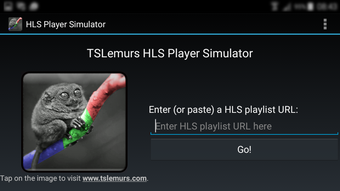
The user interface of HLS Player Simulator FREE is designed with functionality and clarity in mind, prioritizing ease of access to core analysis tools. Navigation is straightforward, allowing users to input a stream URL and initiate analysis with minimal steps. The layout organizes data into clearly labeled sections, including playlist details, segment metrics, and real-time bandwidth indicators.
Workflow efficiency is enhanced by the app’s ability to process and display analytical data in real time. Users can quickly assess ABR behavior, segment download times, and playlist structure without requiring external tools. The interface supports both vertical and horizontal screen orientations, adapting to user preference during testing sessions.
Performance observations are based on general software behavior patterns. The developer did not specify resource usage details. However, as a lightweight Android utility focused on stream analysis, it is expected to operate efficiently on modern devices. Stability during prolonged testing is supported by the "keep device awake" feature, which helps maintain continuous operation without interruption. No reported crashes or performance degradation were mentioned in the provided information.
Compatibility & System Requirements
HLS Player Simulator FREE is designed for Android operating systems. The application is available as a free APK, allowing installation on compatible devices without requiring access to official app stores. The software version and installation size were not specified in the provided input.
Exact system requirements were not listed. Compatibility information is limited to the Android platform. The developer did not provide details on minimum CPU, RAM, or Android version requirements. Users should ensure their device runs a recent version of Android to support modern streaming protocols and secure connections.
Installation is performed via APK file, which may require enabling “Install from Unknown Sources” in device settings. This method offers flexibility but may pose security risks if the source is not trusted. The app does not require a persistent internet connection after initial setup, though stream analysis requires active network access.
Pros and Cons
Pros
- Specialized tool for in-depth HLS stream analysis on Android
- Supports both live and on-demand (VoD) streaming validation
- Provides real-time ABR switching and bandwidth monitoring
- Includes CC error detection and TS segment preview capabilities
- Free to download and use via APK
- “Keep device awake” feature enhances long-term testing reliability
Cons
- Limited to Android platform; no support for Windows or Mac
- No official app store distribution; requires APK installation
- Exact system requirements not disclosed
- Does not support encrypted or DRM-protected streams
- Analysis is limited to non-encrypted TS segments only
FAQ Section
Is HLS Player Simulator FREE available for Windows or Mac?
No, the software is exclusively designed for Android devices. It is distributed as an APK file and does not support Windows or Mac operating systems.
Is the app safe to install from an APK file?
As with any APK installation, users should ensure the source is trusted. The app is developed by TSLemurs, but the developer did not provide a verified distribution channel. Installing APKs from unknown sources may pose security risks.
Does the app require an internet connection?
Yes, an active internet connection is required to fetch and analyze HLS streams. The app does not store streams locally, so connectivity is necessary during testing.
Can I use this tool for encrypted or DRM-protected streams?
No, the app only supports non-encrypted Transport Stream (TS) segments. It does not analyze or validate encrypted content or streams protected by DRM.
How often are updates released?
The update frequency was not specified. Users should check the developer’s official source for the latest version and any new features or fixes.
Final Thoughts + CTA
HLS Player Simulator FREE stands out as a focused, practical tool for professionals working with HLS streaming technology. Its ability to simulate ABR playback, analyze playlist structures, and validate segment delivery makes it a valuable asset in quality assurance and network testing workflows. While limited to Android and non-encrypted streams, its targeted functionality delivers significant insight without unnecessary complexity.
Developers, testers, and network engineers who need to validate stream performance on mobile devices will find this app particularly beneficial. The free APK model increases accessibility, though users should exercise caution when installing from external sources. For those requiring detailed HLS diagnostics on Android, this tool offers a streamlined, no-frills solution.
Download HLS Player Simulator FREE now to validate your streams with confidence.
Guides & Tutorials for HLS Player Simulator FREE APK
How to install HLS Player Simulator FREE APK
- Click the Preview / Download button above.
- Once redirected, accept the terms and click Install.
- Wait for the HLS Player Simulator FREE APK download to finish on your device.
How to use HLS Player Simulator FREE APK
This software is primarily used for its core features described above. Open the app after installation to explore its capabilities.
User Reviews for HLS Player Simulator FREE APK 0
No reviews found





